Cash register system for fitness studios: centrally manage products and sales.
Drinks, products, and additional services are part of everyday life in many fitness studios. The My Gym App cash register system adds a sales area with product overview, shopping cart, and customer assignment to the management.
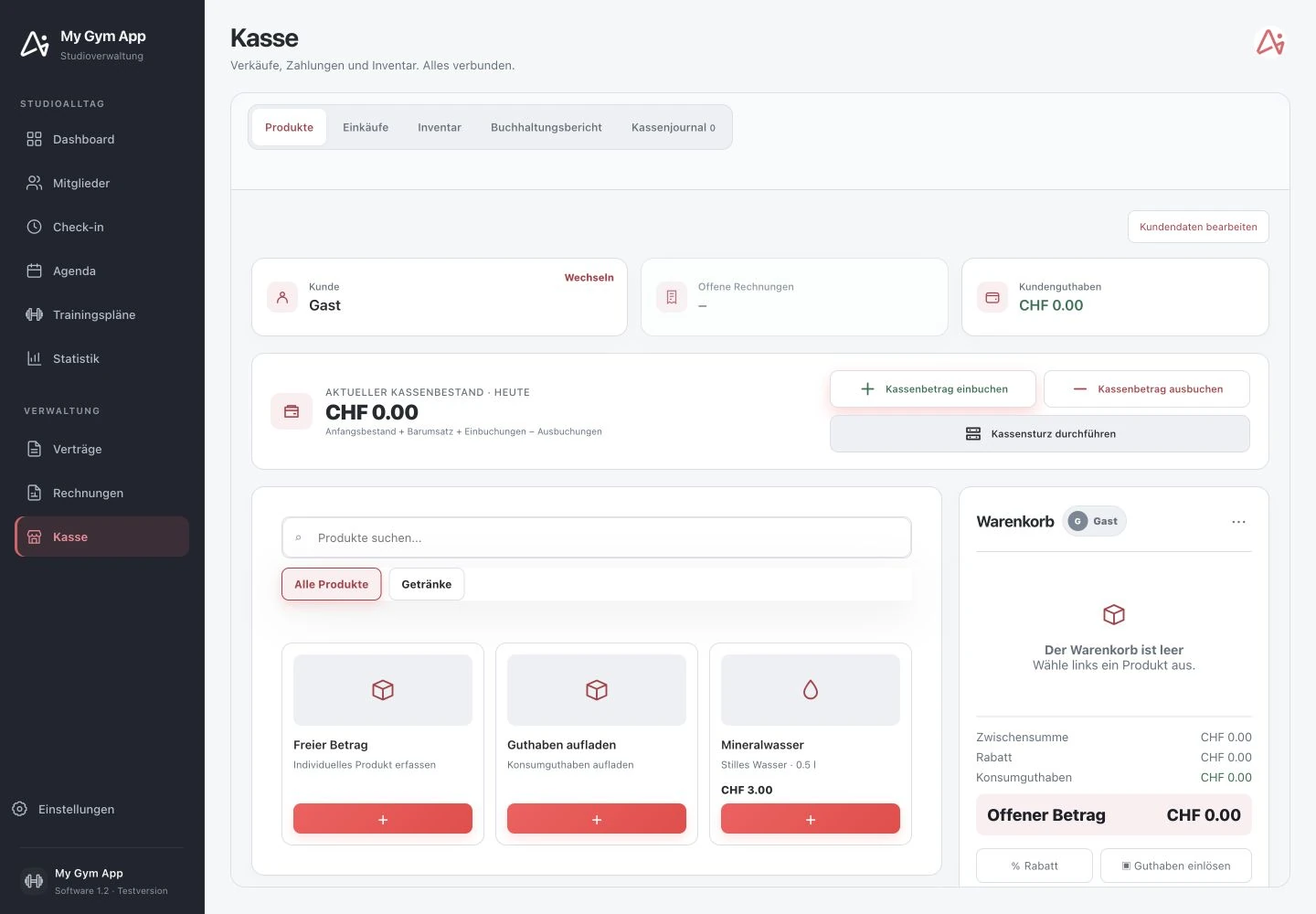
Original recordings of the trial version with fictitious sample data. Interface and functionality may vary depending on version and setup.
Select products and review the shopping cart.
The cash register view displays products and categories alongside the shopping cart. A search helps find the right item. The shopping cart separates subtotal, discount, credit, and outstanding amount. Before completion, the team should once again verify the selection and the intended customer. This keeps the sale a traceable process rather than a detached note.
Differentiate between guest sale and member account.
The shown cash register starts with a guest assignment and offers customer switching. With assigned members, further information such as open invoices and customer credit may be relevant. Correct assignment is especially important if a purchase should later be traceable in the member context or linked to existing credit.
Keep track of cash movements and daily balance.
The reviewed view includes a current cash balance as well as entries for cash-in, cash-out, and cash count. Other areas lead to purchases, inventory, accounting report, and cash journal. However, booking a cash balance is not equivalent to triggering a card or online payment. The entire daily workflow with the actually used payment types must be checked for introduction.
Test with the real assortment.
Typical products and a small test sale are suitable for a meaningful demo. Clarify product prices, discount rules, receipts, tax configuration, and handling of cancellations. The connection to scanner, printer, or payment terminal also depends on the intended setup. The screenshots show the software interface and do not confirm any specific hardware approval.
How to check the process in a demo
- Assign guest or member to the sale.
- Choose products and check shopping cart, discount, and outstanding amount.
- Complete and verify the configured payment and receipt processes.
Frequently Asked Questions
Can the cash register also be used for guest sales?
The reviewed interface distinguishes guest assignment and customer selection. The appropriate process should be tested with your studio.
Is every payment terminal automatically connected?
No. Terminal, payment provider, and interface must fit the intended setup and be explicitly checked.
Working through your studio everyday routine together
Show us your requirements. In a personal demo, we review the suitable processes and necessary setup.
